payments-api #482 · merged PR
docfit bot commented
Docs updated. developer-docs #91 changes 3 pages and is waiting for @docs-team.
Documentation CI for GitHub
When a PR merges, DocFit reads the diff and linked ticket, finds the exact docs pages affected, runs your docs build and checks, and opens a pull request for your team to review.
Free for public repos + 1 private 14-day Team trial No card
100% read-only dry run during setup. It opens zero PRs and sends zero alerts until you turn a repo on. Why each permission is needed
Priya merges payments-api pull request 482, which adds a refund reason and closes Jira ticket API-1234. DocFit queues a docs run straight away, then reads the diff, commits, review comments and the ticket.
DocFit writes a structured change record: POST /v2/refunds gains an optional reason enum, refund.created carries it, the change is not breaking. It then ranks the docs pages the change affects, each with a reason: refunds.mdx from the API spec diff, refund-events.mdx from code, the changelog from a repo rule. The overview page scores below the threshold and is left alone.
DocFit adds a reason ParamField to refunds.mdx and updates the curl example, then runs the repository's own docs build and lint scripts, a link check over 214 links and Redocly lint on the OpenAPI file. All four pass on the first attempt, so confidence is High.
DocFit opens developer-docs pull request 91 with a one-line verdict, a table of the three pages it changed and why, and the checks that passed. It comments on the merged code PR and pings the docs channel in Slack. A human reviews and merges.
Real example on GitHub: example-payments-api #1 → example-payments-docs #1, one merge in, one checked docs PR out
Works with the docs and GitHub workflow you already have
5PRs
dry-run automatically at setup so you can inspect real output before enabling a repo
4checks
build, link check, OpenAPI lint and your repo scripts run before a human looks
0merges
made by DocFit. Your team decides what ships
∞teammates
No per-seat pricing. Invite the whole team
DocFit isn't an AI with access to your repo, guessing which pages look related. It works out what a merge actually affected, makes the smallest edit, proves it, and hands the decision to your team.
DocFit reads the PR the way a reviewer would, and the ticket behind it, so the docs explain intent, not just the new field, and a ticket's acceptance criteria end up on the page.
Pull request
Add refund reason to POST /v2/refunds
#482 · 3 commits · 2 review comments
Diff
src/refunds/create.ts+18 −2
openapi/spec.yaml+9
src/events/RefundEvent.ts+3
Ticket · API-1234
Refund reason on create refund
3 acceptance criteria · fix version 2.14
Skip check · fast model, under a cent
Docs affected public endpoint and webhook payload changed
Change record
POST /v2/refundsreason enum · optionalrefund.created carries reasonpayments-api #483 · Refactor retry helper
No docs impact. Only tests and an internal helper changed.
The whole change, not just the diff
PR title and body, commits, review comments, and the linked ticket's description and acceptance criteria.
Jira Cloud and GitHub Issues
The ticket is found from the branch, title, commits and body, limited to the projects you allow.
Skips cheaply, and says why
A fast first pass decides whether docs can be affected at all. If not, one comment on the PR, and no credits used.
[A-Z][A-Z0-9]+-\d+ in the branch, title, commits and body, in that order; GitHub Issues links like Fixes #123 count too.Not every changed file means a docs change, and DocFit doesn't treat semantic similarity as proof. It combines the change itself, the API spec, code symbols, repo history and your rules to decide what's affected.
Deterministic signals first
An OpenAPI diff of the changed operations, and code symbols from the diff (routes, exports, enums, env vars, CLI flags) matched word for word against your pages.
What your team did before
Pages that similar changes touched in past runs and reviewer-merged PRs, plus your rules that name paths.
Every page has a reason
Pages are ranked with the signal that found them. Weak matches are left alone, not guessed at.
The difference between a docs PR you can merge and one you have to rewrite is proof. Every docs PR ships with the result of your own build and lint, not a model's word for it.
Framework defaults, when you have no commands
Hard limits on every edit
Minimal edits in your framework's idiom
MDX components like <ParamField>, frontmatter, nav files, OpenAPI descriptions and examples. Your rules apply on every run.
Build, lint, links, spec
Your repo's configured scripts run first (checks.commands / package.json), then framework defaults fill the gaps: mint broken-links, npm run build, redocly lint, mkdocs build --strict.
Code samples that actually run
curl, JS, Python and PHP samples run against a mock built from your spec (Team), or your own sandbox (Growth).
The AI is boxed in
It only touches your docs, has no network access, and the final diff is checked before the PR opens.
checks.commands, then package.json scripts, Makefile targets and CI steps. Framework defaults only fill the gaps.Human-controlled by design: DocFit opens the PR, your team decides what ships. It never changes a ticket's status or writes outside its own docfit/ branches.
payments-api #482 · merged PR
docfit bot commented
Docs updated. developer-docs #91 changes 3 pages and is waiting for @docs-team.
API-1234 · comment
DocFit · 2 min ago
DocFit: docs PR developer-docs #91 opened. 3 pages updated, checks passed.
docs-updated status unchanged
#docs
DocFit APP
Docs PR ready for review · developer-docs #91
payments-api #482 · 3 pages · checks passed · High
Monday digest · example
Your docs kept up with 11 merges last week
New rule learned: "Write API key, never api-key or token." Approve
A PR body you can scan in ten seconds
A one-line verdict, a table of pages and why, check results, confidence and the rules it used.
Drafts when it isn't sure
Low confidence or failed checks open a draft instead of a ready PR.
Reports back where you work
One comment on the merged PR, one on the ticket, a Slack ping with View and Skip, and a Monday digest.
Steer it from the PRTeam
@docfit regenerate, explain, include <path> and skip, right in the conversation.
docfit/<repo>-pr-<n> branch and PR instead of opening a duplicate.DocFit reads your change to write your docs. It doesn't keep your code, train on it, or touch anything outside your docs.
See the full security modelOne run, start to finish
Shallow clone
Just the merge commit, limited to your docs folder where there is one
Read diff, PR and ticket
Untrusted text is fenced; nothing in it is ever executed
Edit and verify
Writes only inside the docs target; the agent has no network
Docs PR opened
One commit on a docfit/ branch. Never merged by DocFit
Clone gone
The run ends and the container goes with it. Your source code is never saved
Least-privilege GitHub App permissions, explained:
Contents (Read & Write):
Required by GitHub to read diffs and push commits to docfit/* branches. Hard-blocked in code from ever writing to main or modifying files outside your configured docs path.
Pull Requests (Read & Write):
Reads merged PR context and opens docs PRs.
Issues (Read & Write):
Reads linked GitHub Issues for acceptance criteria and posts a single link comment when a docs PR opens (completely silent during setup dry runs).
Source code never stored
Each run works in a short-lived container. Your source code, PR descriptions and ticket text are never kept.
Never used for training
Models run under API terms that exclude training on your data. Bring your own key to keep inference in your own account.
Only the repos you pick
A least-privilege GitHub App. Every repository stays off until you turn it on.
Never merges
DocFit opens the PR. Your team decides what ships, and uninstalling stops access at once.
DocFit isn't your docs platform. It's the layer that keeps the docs inside it from drifting. Your docs stay in Git, your build stays in place, and DocFit contributes through normal pull requests.
1# every key is optional; auto-detect fills the rest2trigger:3 branches: [main, release/*]4 paths_include: [src/api/**, openapi/**]5 skip_labels: [no-docs]6 skip_authors: [dependabot[bot]]7docs:8 mode: external9 repo: acme/developer-docs10 path: docs/payments11 framework: mintlify12 openapi: openapi/spec.yaml13tickets:14 provider: jira15 projects: [API, PLAT]16checks:17 commands: [pnpm docs:build, pnpm docs:lint]18 links: true19 openapi_lint: true20review:21 reviewers: [docs-team]22 min_confidence: medium23rules:24 - New endpoint pages get curl and Python examples.
Repository settings · Branches
Saving here opens a PR to .docfit.yml.
Runs on the merges you choose
Branches like main and release/*, path filters, skip labels such as no-docs, and bot authors like Dependabot.
One config, two editors
.docfit.yml and the dashboard stay in step. Every setting shows where it came from, and saving in the UI proposes a PR to the file.
Any past PR, on demand
Run on a merged PR by URL, a list or a date range. During setup, DocFit dry-runs your last 5 merges.
Same repo or a separate one
Docs next to the code, in their own repo, or rendered straight from an OpenAPI file.
Reviewers turn corrections into rules. DocFit applies them on every later run, so nobody gives the same feedback twice, and each rule shows how often it's used and how often reviewers kept its effect.
Example
meera reviewed · 3 weeks ago
We say "API key", never "api-key" or "token". Everywhere, please.
docfit bot replied
Fixed here. I also proposed a workspace rule so this sticks: Write "API key", never "api-key" or "token".
Write "API key", never "api-key" or "token".
Active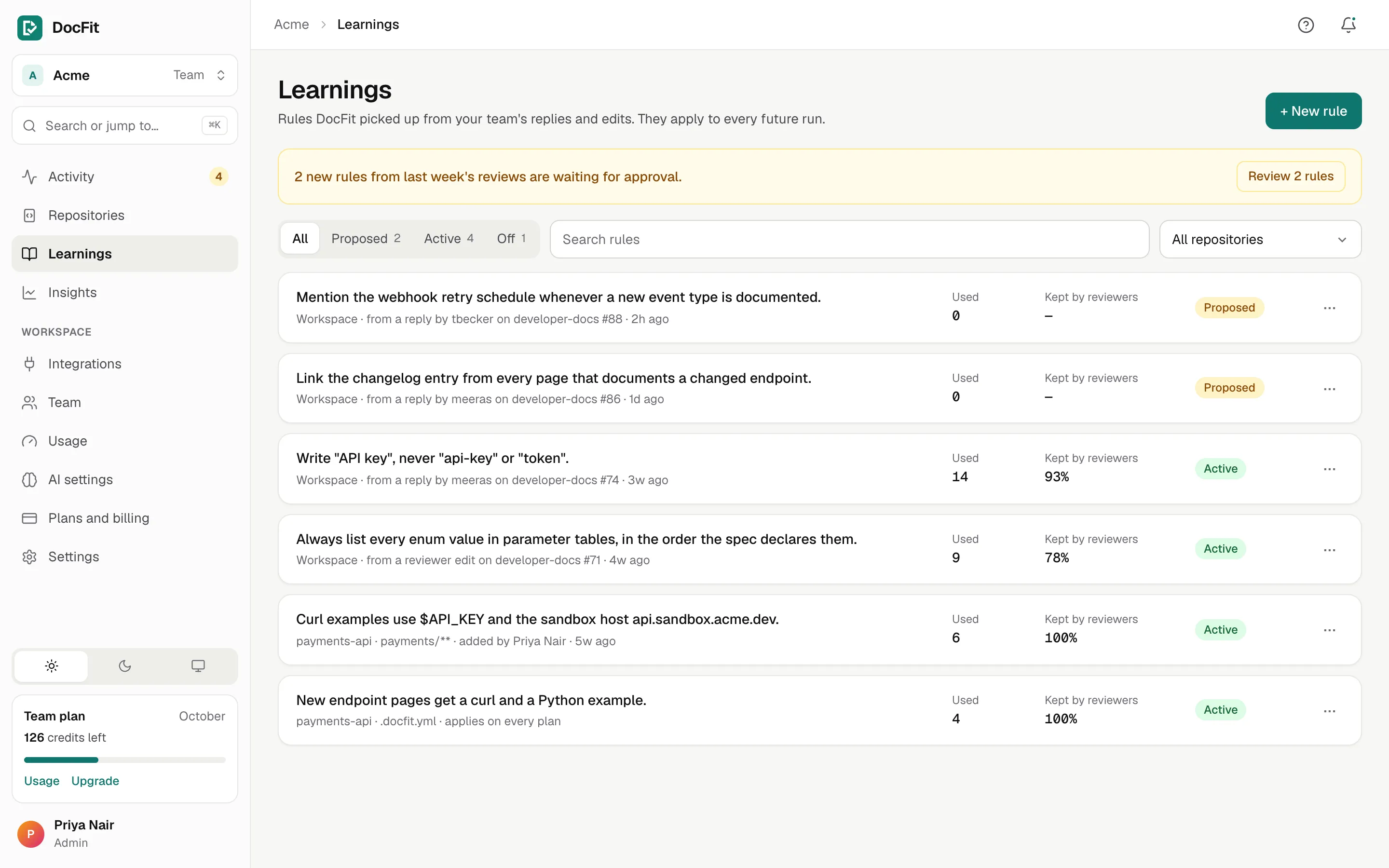
Reply to teach
Answer DocFit on a docs PR like you'd answer a teammate. Replies that read like instructions become proposed rules.
Edits count too
The diff between DocFit's commit and what your reviewer merged is learned from.
Admins approve
New rules wait for an admin. The Monday digest repeats the ask. Scope a rule to the workspace, a repo or a path.
Rules in code
Rules in .docfit.yml apply on every run and every plan, and every PR lists the rules it used.
Pick a folder or a new repo and a framework. DocFit reads the code (README, manifests, OpenAPI, routes and handlers, never tests or build output), plans 4–12 pages and opens a starter docs PR with the framework's config. Then it keeps them in step.
Model calls go to your own Anthropic, Vertex AI or OpenRouter account, and each docs PR uses a flat 2 credits however large the change.
Email or Slack when a docs PR needs you or a run fails, and a Monday digest of what DocFit did last week.
No per-seat charge. Invite by email or share a link for your company domain. Admins manage repos, integrations and billing; members run, review and teach.
Runs that change no docs, skipped internal changes, failed runs, and your 5-PR setup dry run are free. You only use your plan allowance when DocFit opens a docs PR.
No new workflow to adopt. Use the dashboard to connect repos, see what each run did and why, and manage rules, usage and your team.
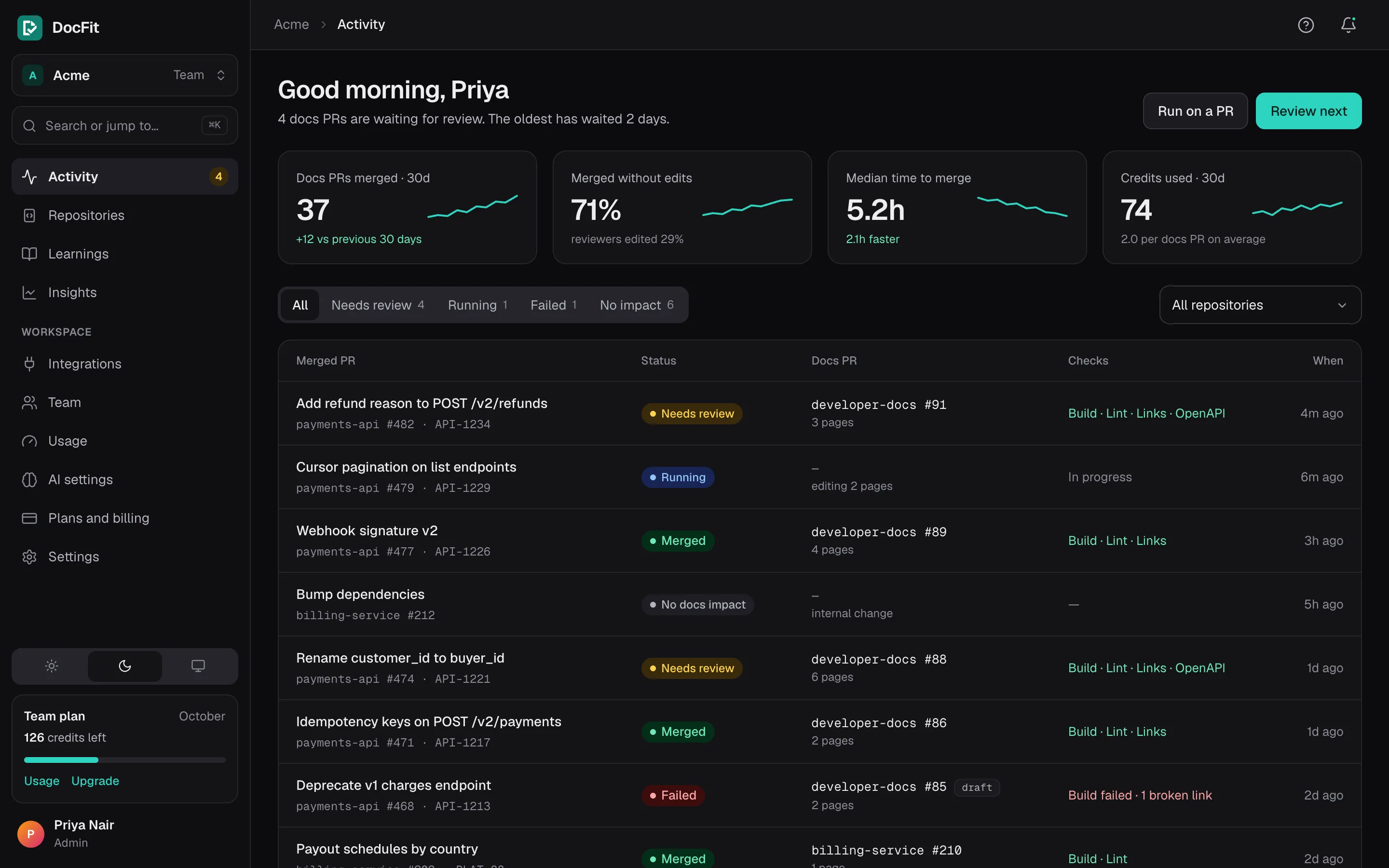
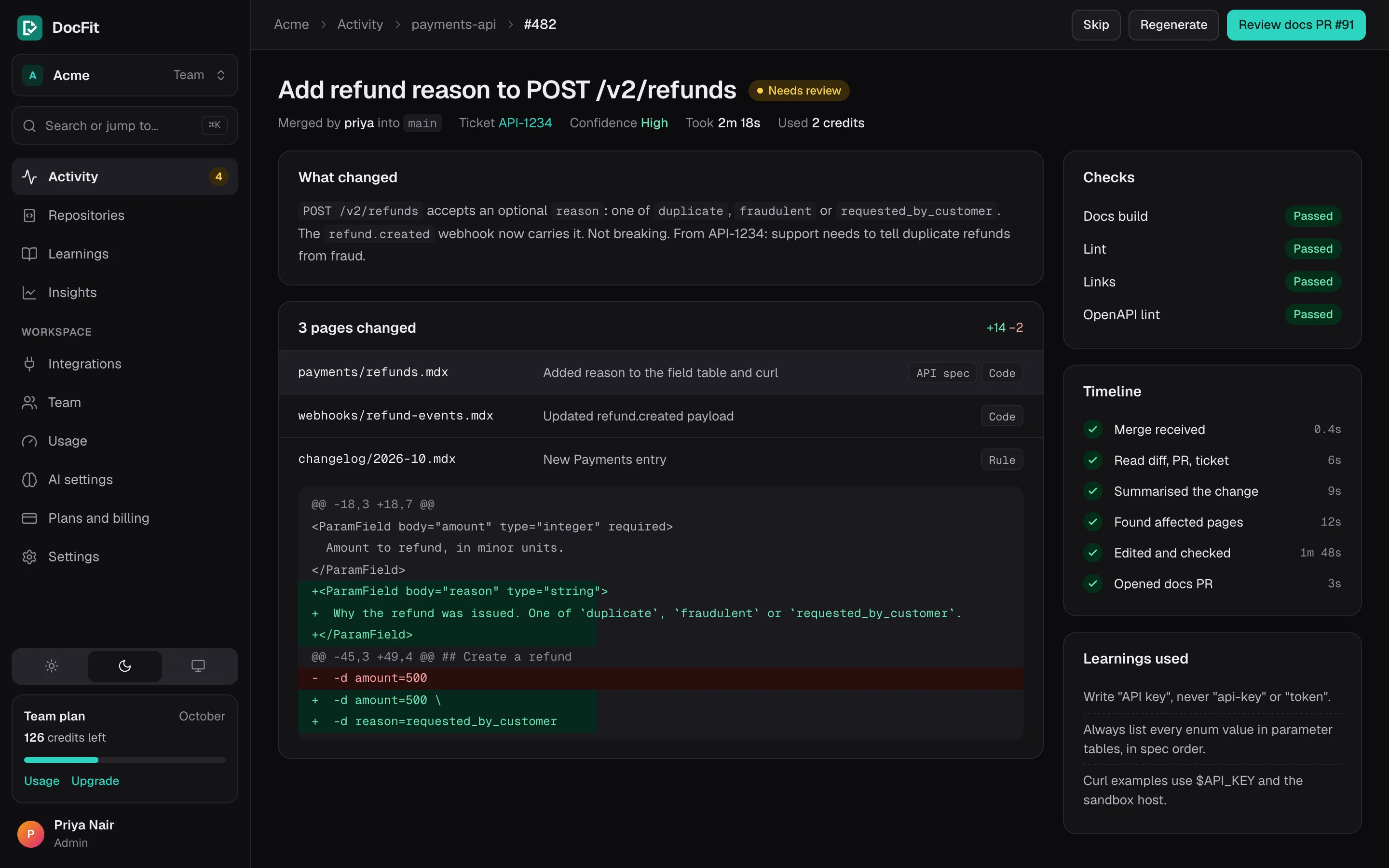
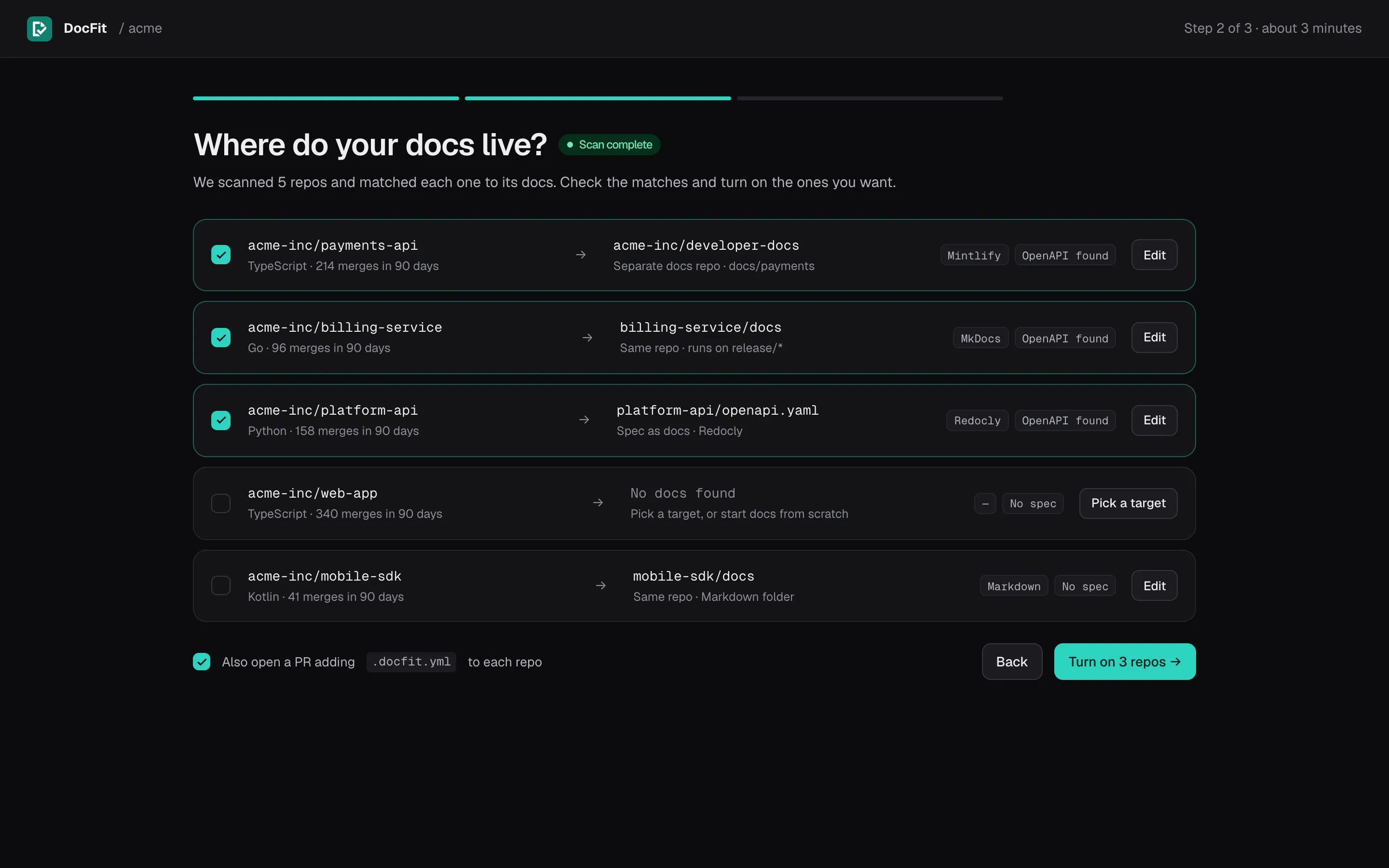
The run feed is home
Every decision, explained
Safe, read-only setup in 3 steps
Start free. Every plan includes your whole team, and merges with no docs impact are always $0.
Free
For open-source projects and single repos
No card, no time limit
Team
For engineering teams shipping a few APIs or products
14-day trial on private repos, no card
Growth
For API companies running DocFit across many repos
Cancel any time from the billing portal
docfit/ branches.checks.commands in .docfit.yml, then package.json scripts, so Vale, markdownlint or Spectral run when your scripts call them. Anything left uncovered falls back to framework defaults: mint broken-links, npm run build, mkdocs build --strict, and redocly lint on the spec. Failures go back to the agent for up to three repairs. If checks still fail, or confidence is low, the PR opens as a draft with the problems listed.redocly lint on OpenAPI specs; custom checks such as Vale, markdownlint or Spectral run when you configure them in package.json or .docfit.yml..docfit.yml. Every PR lists the rules it used, and each rule shows how often reviewers kept its effect.Connect the GitHub App and run a silent dry run on your last 5 merged PRs inside the dashboard. Nothing is opened or posted on your repos until you choose.